Cómo descargar fotos de Instagram: métodos sencillos que funcionan.

Instagram está repleto de fotos sobre casi cualquier tema: viajes, moda, fotografía, comida, productos e intereses personales. Al navegar, es posible que encuentres imágenes que quieras guardar para verlas sin conexión o para organizarlas en tu ordenador. En esta guía, te explicaremos si puedes descargar fotos de Instagram y te mostraremos varios métodos sencillos para guardarlas fácilmente.
1. ¿Se pueden descargar fotos de Instagram?
Sí, existen varias maneras de guardar fotos de Instagram en tu dispositivo. La función de guardar integrada de Instagram te permite marcar publicaciones para verlas más tarde, pero normalmente no guarda el archivo de imagen en tu teléfono o computadora.
Si quieres descargar una foto de Instagram como archivo de imagen, puedes usar un descargador de fotos de Instagram en línea, una extensión para el navegador o un programa específico para ordenador. También puedes hacer una captura de pantalla, pero la calidad de la imagen puede ser inferior y requiere recortarla.
2. El mejor descargador de imágenes en masa recomendado para descargar fotos de Instagram: PicCat
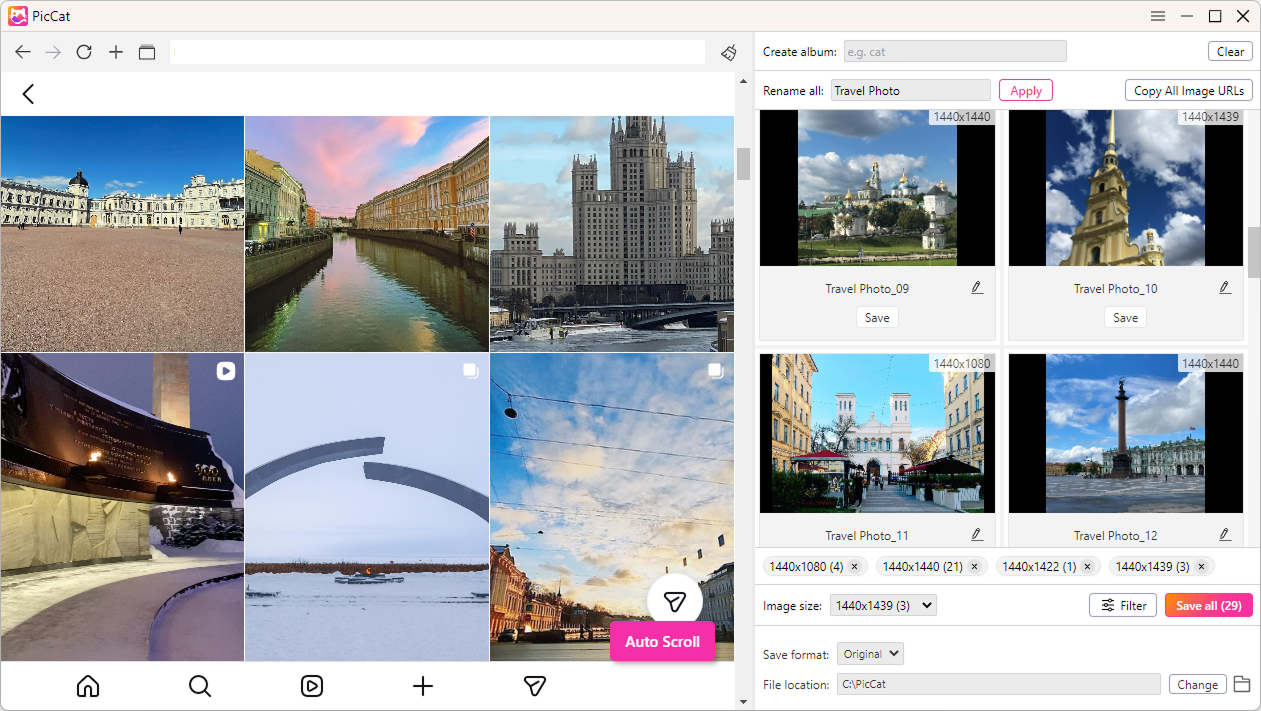
Para los usuarios que necesitan descargar varias fotos de Instagram, PicCat PicCat es un programa recomendado para descargar imágenes en lotes en tu ordenador. En lugar de abrir repetidamente las imágenes y guardarlas individualmente, PicCat está diseñado para detectar imágenes en páginas web compatibles y descargar varios archivos de forma más eficiente.
Esto la hace especialmente útil para fotógrafos, diseñadores, investigadores, profesionales del marketing y cualquier persona que trabaje habitualmente con grandes colecciones de imágenes en línea.
Características principales de PicCat:
- Soporte de plataforma – Descarga imágenes de todos los sitios web de alojamiento de imágenes, incluido Instagram.
- Descarga masiva de imágenes – Descarga varias imágenes de páginas web y URL de imágenes.
- Imágenes de calidad original – Extraer las imágenes con su calidad original disponible.
- Filtrado inteligente de imágenes – Filtra las imágenes por formato y tamaño.
- Cambio de nombre por lotes – Cambie el nombre de varios archivos utilizando reglas de nomenclatura personalizables.
- Exportación de URL – Copia o exporta las URL de las imágenes con un solo clic.
- Compatibilidad con múltiples formatos – Admite JPG, PNG, GIF, WebP, SVG y más.
Pasos para descargar varias fotos de Instagram con PicCat:
- Descarga, instala y ejecuta la aplicación de escritorio PicCat.
- Dentro de PicCat, abre la publicación o página de Instagram que contiene las fotos que deseas guardar.
- Configura PicCat para que desplace automáticamente la página y detecte las imágenes disponibles.
- Seleccione las fotos originales que desea descargar; cambie el nombre de los archivos si es necesario.
- Inicia la descarga y guarda todas las imágenes de Instagram en la carpeta que prefieras.
3. Los mejores descargadores en línea para descargar fotos de Instagram
Los descargadores de fotos de Instagram en línea son prácticos porque funcionan directamente en tu navegador web. La mayoría no requiere instalación de software, por lo que son ideales cuando solo necesitas descargar unas pocas fotos.
Opciones populares:
- OnlineImageSaver
- SnapInsta
- Descargador de fotos de Instagram Inflact
- Descargador de fotos de Instagram Toolzu
Pasos:
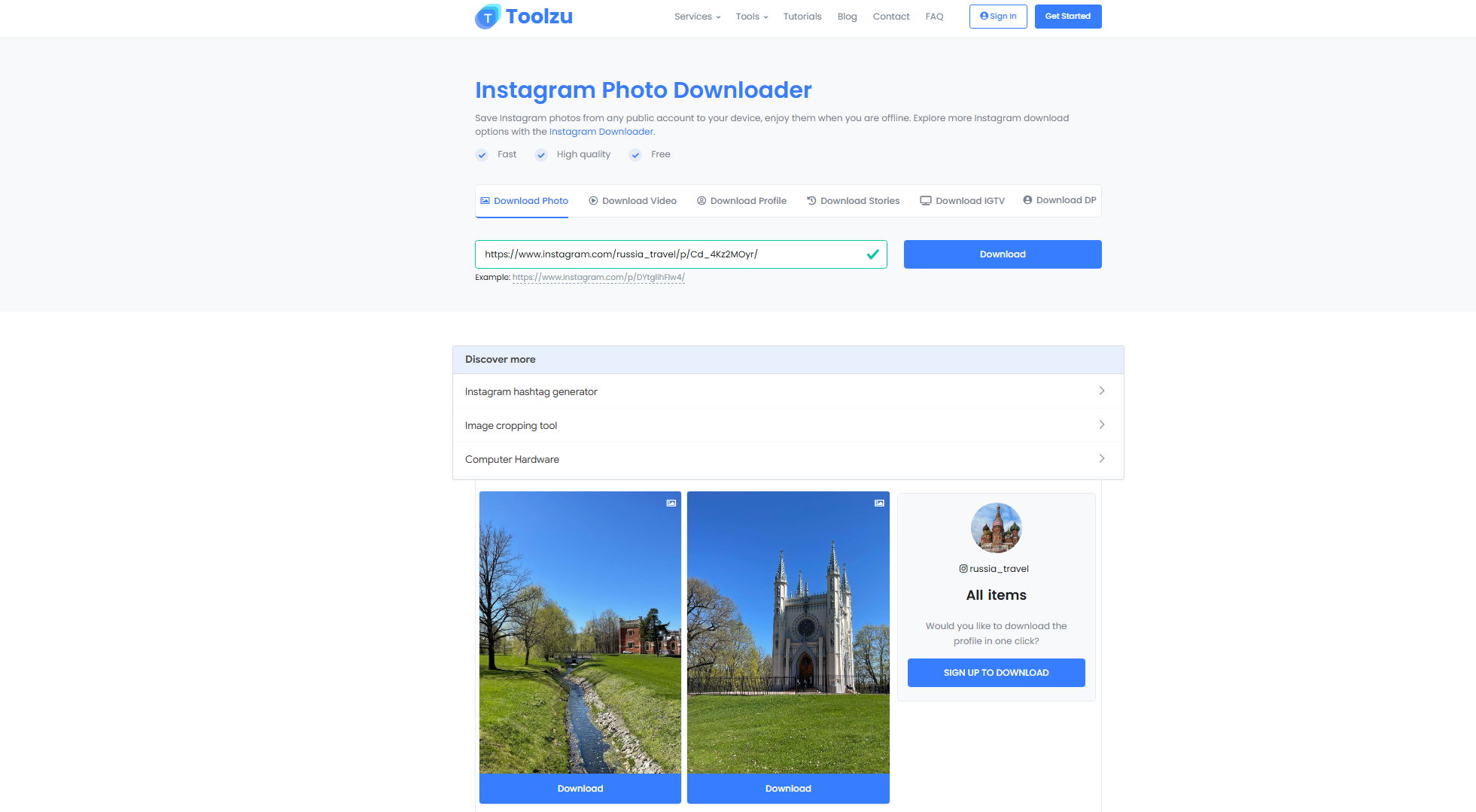
- Busca la(s) foto(s) de Instagram que quieras descargar y copia la URL de la publicación.
- Abre un programa online para descargar fotos de Instagram, como Toolzu Instagram Photo Downloader, y luego pega la URL en el programa.
- Inicie el análisis, luego elija la opción de descarga disponible y guarde las fotos.
Ventajas :
- No requiere instalación. – Utilizar directamente en un navegador web.
- Fácil de usar – Normalmente solo requiere copiar y pegar una URL de Instagram.
- Funciona en todos los dispositivos. – Se puede utilizar en ordenadores, teléfonos y tabletas.
- Opciones gratuitas disponibles – Muchas herramientas en línea ofrecen descargas básicas sin costo alguno.
Desventajas :
- Descarga masiva limitada – La mayoría de las herramientas en línea están diseñadas para imágenes individuales, no para grandes lotes.
- Se requiere conexión a Internet – Debes permanecer conectado mientras se procesa y descarga.
- Anuncios y ventanas emergentes – Algunos servicios gratuitos pueden mostrar anuncios.
- Limitaciones de calidad – Es posible que algunas herramientas no ofrezcan la máxima calidad de imagen disponible.
- preocupaciones sobre la privacidad – Los sitios web menos consolidados pueden recopilar URL o datos de uso.
4. Mejores extensiones para descargar fotos de Instagram
Las extensiones del navegador ofrecen otra forma de descargar imágenes directamente mientras navegas. En lugar de visitar un sitio web aparte, puedes instalar una extensión en tu navegador y usarla para identificar imágenes descargables en las páginas web.
Opciones populares:
- Descargador Turbo para Instagram
- Descargador de imágenes para IW
- Descargador de imágenes Imageye
- Descargador masivo de imágenes desde una lista de URL
Pasos:
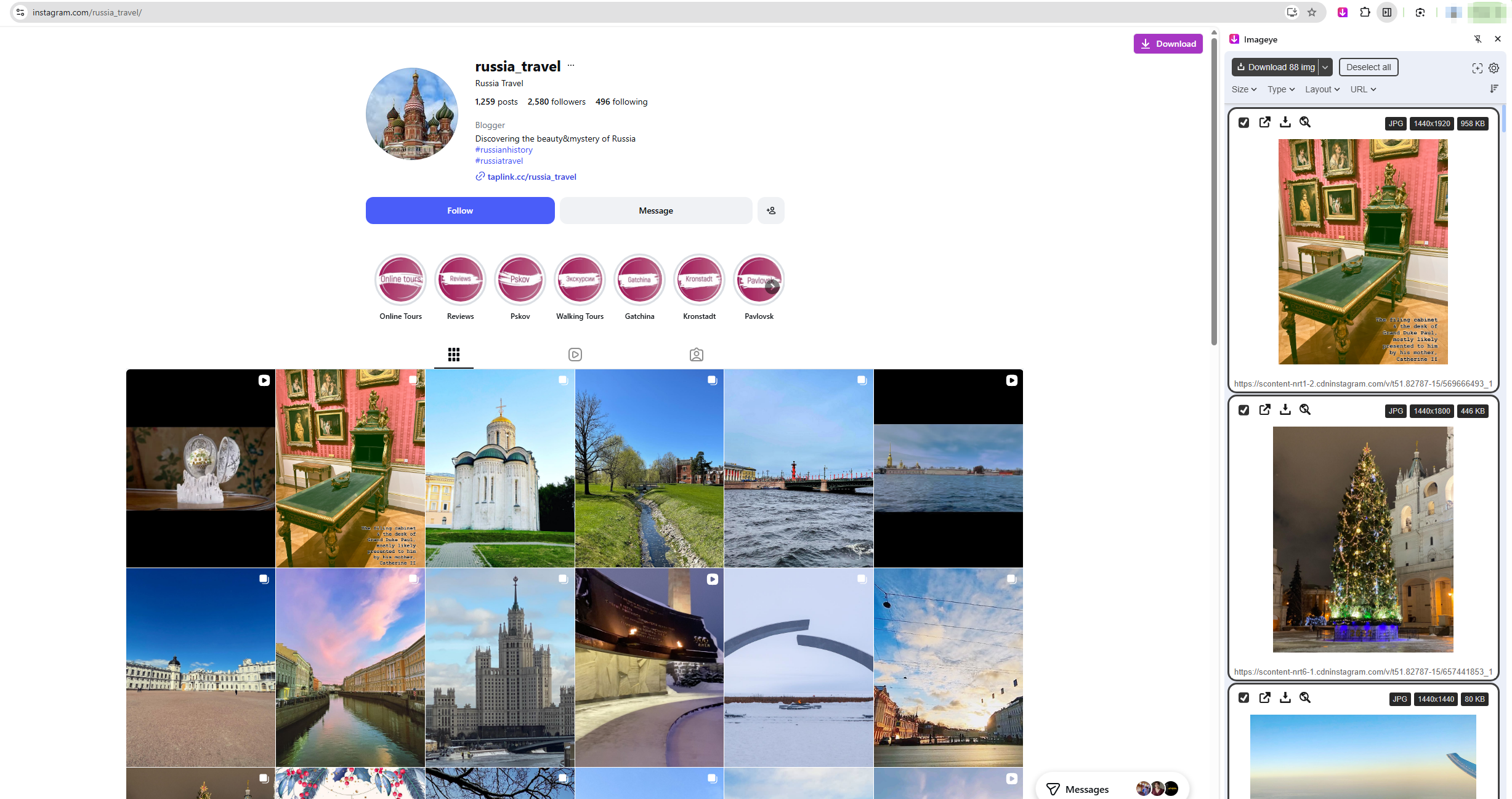
- Añade a tu navegador la extensión de descarga de imágenes que prefieras, como Imageye.
- Visita Instagram y navega hasta la publicación o página correspondiente, luego haz clic en el icono de la extensión en la barra de herramientas de tu navegador y permite que la extensión detecte las imágenes disponibles.
- Selecciona las fotos que quieras guardar, haz clic en la opción de descarga y guarda las fotos seleccionadas.
Ventajas :
- Conveniente – Descarga imágenes directamente mientras navegas por Instagram.
- No copiar URL – Muchas extensiones añaden botones de descarga o detectan automáticamente las imágenes.
- Acceso rápido – Útil para guardar imágenes individuales rápidamente.
- Detección de imágenes – Algunas extensiones pueden encontrar varias imágenes en una página web.
- Integración con el navegador – Funciona dentro de su navegador Chrome, Edge u otro navegador compatible.
Desventajas :
- Depende del navegador – Normalmente requiere un navegador compatible y una extensión compatible.
- Descarga masiva limitada – Muchas extensiones no están diseñadas para descargar grandes cantidades de imágenes.
- Permisos de extensión – Algunos pueden solicitar acceso a la actividad de navegación o al contenido de las páginas web.
- Problemas de compatibilidad – Las actualizaciones de Instagram pueden provocar que las extensiones dejen de funcionar correctamente.
- Posibles riesgos para la privacidad – Las extensiones de desarrolladores desconocidos pueden recopilar datos innecesarios.
- Rendimiento del navegador – El uso excesivo de extensiones puede ralentizar el navegador.
5. Conclusión
Existen varias formas de descargar fotos de Instagram, y el mejor método depende de cuántas imágenes necesites guardar. Para descargas ocasionales, herramientas en línea como OnlineImageSaver, SnapInsta, Inflact y Toolzu ofrecen opciones prácticas basadas en el navegador. Las extensiones de navegador como Turbo Downloader para Instagram, Image Downloader para IW, Imageye y los programas de descarga masiva también pueden simplificar el proceso.
Sin embargo, si necesitas descargar varias fotos de Instagram con regularidad, una herramienta de escritorio específica es una opción más práctica. PicCat Es nuestro programa recomendado para descargar imágenes en lote, ya que está diseñado para detectar y descargar varias imágenes a la vez que reduce el trabajo manual repetitivo.